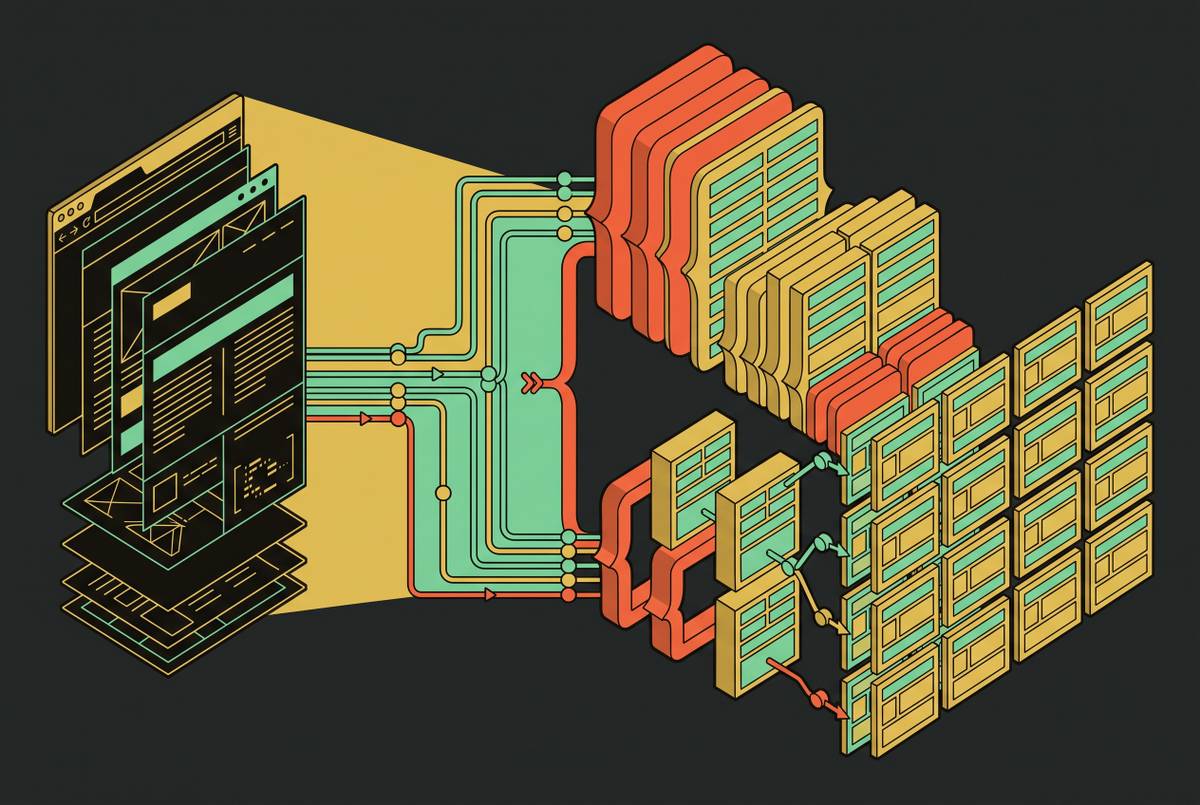
Extracting Structured Brand Data From Company Websites
A tool to extract live brand data from company websites as structured JSON.

Company websites hold some of the richest, most current brand data you can find anywhere, but most AI pipelines never touch it in a usable form. A company's homepage, pricing page, and about page carry logos, color systems, leadership names, product specs, and positioning copy, all updated continuously as the business changes. This data is public and sitting in plain view. Most pipelines either skip this data entirely or pull it down as raw HTML, which then needs hours of cleanup before anyone can actually use it.
That cleanup burden comes from a basic mismatch in tooling. Document-AI platforms read static files: PDFs, scanned forms, invoices. Web-scraping APIs read live URLs: the pages that make up a company's actual site, as it exists right now. Tools built for the first job cannot do the second one. A parser tuned to pull line items off a scanned invoice has no way to reach a pricing page hosted on a live domain, and reaching for that kind of tool to scrape the open web is the most expensive mistake a team can make in this category. The fix is pointing the right kind of tool at the data rather than a document-AI platform built for static files.
A huge amount of structured, valuable, constantly-refreshing brand information sits on company websites as a queryable asset that most tools treat as noise. Pricing changes, a new executive hire, a rebrand, a new product tier: all of it happens in public, on the company's own site, and most AI products reasoning about that company are working from a stale snapshot or nothing.
What brand data looks like when it is structured
Brand data splits into four categories, and each one is useful to a different kind of downstream application.
The first is visual identity: logo assets and their variants (primary, monochrome, icon-only), color palettes as hex values, font families and weights, and tokens for motion, texture, and shadow. It defines how a brand looks and feels, and document-AI platforms cannot reach it at all, since it only exists on live, rendered pages. A web-scraping API reading that same URL returns it as clean JSON or Markdown instead.
The second is messaging and positioning: the hero tagline, the subheading that explains what the product does, product names and their one-line descriptions, and the customer logos or testimonials a company chooses to show off.
The third is commercial data: pricing tier names and prices, the feature list under each tier, product SKUs, variant specs, and whether something is in stock or available.
The fourth is firmographic data: executive names and titles (CEO, CTO, founders), headquarters location, founding year, and company size.
Taste Labs' Brand API, launched September 15, 2026, makes this concrete. Pointed at a single URL, it returns a full design system: logos, colors, typography, animation, motion, textures, and shadows. That is a structured identity snapshot pulled from one site, not a dump of HTML someone then has to pick apart by hand. Cofounder, built by General Intelligence co-founders Andrew Pignanelli and Abhishyant Khare, puts that same extraction to work as a product feature rather than a research step: a user types in a website URL, and the product retrieves the associated design assets and tokens directly through the Taste Labs Brand API. Brand extraction, in that case, becomes an input a product consumes automatically, not something a person does once and forgets.
Why layout-dependent scrapers fail on brand sites specifically
Selector-based scrapers break constantly on brand sites, and the reason has to do with what those sites are built to do. A brand site exists to show off visual identity, not to expose a stable, predictable HTML structure. Every redesign, every CMS migration, every new marketing campaign can shuffle the class names and page layout a scraper depends on.
Four failure modes appear repeatedly on brand sites, and none of them are edge cases. Layout and class-name changes break CSS selectors the moment a site gets redesigned. A lot of page content is missing from the raw HTML a simple scraper fetches because the browser builds that content on the client side. Page structure is inconsistent even within one site: a pricing page might use a table on one visit and switch to a card layout after a redesign, breaking any rule written for a single format. And the quietest failure mode of all is staleness: a scraper keeps returning the same value it always has, even after the source page has changed in a way the scraper never caught, so nothing throws an error and the bad data just keeps moving downstream.
That last failure mode does the most damage to brand data in particular. A logo that changed six weeks ago, or a pricing tier that got renamed, keeps circulating through an AI pipeline with no flag anywhere saying it's wrong. The extraction hierarchy that experienced teams use (hit an API first, fall back to embedded JSON, use a headless browser when needed, and treat raw HTML scraping as the last resort) still holds up as a general approach. But knowing which rung of that hierarchy applies to a given page requires understanding what the page actually exposes on that particular visit, and a static selector script has no way to know that.
How schema-driven AI extraction survives redesigns
Schema-driven extraction moves the point of failure somewhere more durable. Instead of writing a selector tied to one specific HTML element, you define the fields you actually want, and a language model maps the page's content onto those fields. A redesign changes what the page looks like. It does not change what the developer is asking for, so the extraction logic keeps working.
A schema for brand data might look like this:
{
  "ceo_name": "string",
  "pricing_tiers": [
    { "name": "string", "price": "string", "features": ["string"] }
  ],
  "primary_logo_url": "string",
  "brand_colors": ["string"]
}
The extraction layer fetches the page, renders it the way a browser would, converts the HTML into Markdown built for language models (which cuts down on wasted tokens and keeps the page's structural boundaries intact), and then asks the model to fill in the schema from what's visible on the page. The model reads the page roughly the way a person does. If it sees "Talk to sales" sitting next to a blank price field, it understands that as enterprise pricing rather than failing to match a pattern it was never told to expect.
That's the real payoff: the same schema configuration keeps working after a site goes through a full rebrand or a CMS migration, conditions under which a selector-based scraper would start quietly returning null values or the wrong ones. Web-scraping APIs built around live URLs return clean JSON or Markdown made for LLM, RAG, and agent pipelines, and that matters because brand data changes by the hour in places like pricing pages, where freshness counts for more than matching some fixed template.
Defining a schema also forces better data quality before extraction even starts. Naming a field "pricing_tiers" and typing it as an array of objects forces a developer to decide up front what "pricing" actually means for their use case, catching ambiguity that a raw scraper would otherwise swallow silently and pass downstream.
Designing schemas for the four brand data categories
Each of the four brand data categories has a predictable shape, and getting that shape right in the schema is what separates clean output from a mess to sort through later.
A visual identity schema typically covers:
{
  "logo_url": "string",
  "logo_variants": [{ "type": "string", "url": "string" }],
  "primary_colors": ["string"],
  "secondary_colors": ["string"],
  "font_family_heading": "string",
  "font_family_body": "string"
}
Taste Labs' Brand API is a useful reference point here: its extraction covers logos, colors, typography, layout, components, motion, textures, and shadows, which gives a sense of how far a complete visual identity schema can extend beyond just a logo and a palette.
A messaging and positioning schema usually includes:
{
  "tagline": "string",
  "value_proposition": "string",
  "product_names": ["string"],
  "key_customers": ["string"],
  "positioning_category": "string"
}
That last field, positioning_category, is where a model classifies a company into something like "AI infrastructure" or "developer tool" based on how it describes itself.
A commercial schema needs to handle ambiguity directly:
{
  "pricing_tiers": [
    { "name": "string", "price": "string", "billing_period": "string",
      "features": ["string"], "cta_label": "string" }
  ],
  "has_free_tier": "boolean",
  "enterprise_contact_only": "boolean"
}
When a pricing tier says "Talk to sales" instead of listing a number, a well-designed schema tells the model to return null for price and true for enterprise_contact_only. Whether you capture that cleanly or lose it comes down to how you built the schema.
A firmographic schema rounds things out:
{
  "ceo_name": "string",
  "founders": ["string"],
  "leadership": [{ "name": "string", "title": "string" }],
  "hq_city": "string",
  "founded_year": "string",
  "employee_count_range": "string"
}
Three principles hold across all four categories. Use typed arrays instead of unstructured strings for anything list-like, like feature lists or color palettes, since that keeps aggregation clean downstream. Use boolean flags for presence-or-absence signals rather than leaving a field null with no explanation attached. And name every field for what it means, not for the HTML tag it came from: tagline, not h1_text.
Calling a structured extraction API: what the integration looks like
The integration itself is small. Pass a URL and a JSON schema to a single REST endpoint, and get the populated fields back. There's no scraper to maintain and no HTML parser to write by hand.
A minimal request looks like this:
POST /extract
{
  "url": ",
  "schema": {
    "tagline": "string",
    "pricing_tiers": [
      { "name": "string", "price": "string", "features": ["string"] }
    ],
    "ceo_name": "string"
  }
}
The API handles the parts that used to be separate engineering problems on their own: rendering JavaScript, getting past anti-bot protection, and converting HTML into Markdown. The response comes back as the schema itself, filled in with values read off the live page.
The maxAgeMs parameter controls how stale extracted data is allowed to get before a re-fetch is triggered. The scrape endpoints support this parameter with a default of three days, and it can be set anywhere up to a full year. Raise it for reference content that barely changes, like an about page or a company's founding story. Lower it, or set it to zero, for pricing pages, where a value six weeks old is the kind of silent staleness that makes brand data untrustworthy.
Keeping extracted brand data current as sites change
Even a perfect extraction goes stale eventually, and different fields go stale at different speeds. So a production pipeline needs to configure freshness deliberately, not assume it.
Pricing tiers and feature lists move the fastest. Treat these as high-frequency fields, re-extracted on a short TTL or triggered by an event, since they can change with any product update. Leadership names and titles shift less often but just as silently, so a quarterly re-extraction schedule is a reasonable floor. Visual identity tokens, like logos and color palettes, are the most stable of the four categories, but they're also the highest-stakes to get wrong: a rebrand that isn't picked up means old logos and colors keep circulating through a pipeline with nothing flagging the problem.
Two monitoring patterns address this. The first is TTL-based re-extraction: set maxAgeMs differently per field category, so pricing pages refresh far more often than an about page does. The second is newer: change-event pipelines, where a detected change on a page becomes an event fed straight into a data pipeline instead of a notification sitting in someone's inbox waiting to be triaged. A structured diff from that event can update only the chunks of a RAG pipeline that actually changed, avoiding a full re-index.
Semantic diffing makes this sharper still. Natural-language instructions can tell a monitoring system which changes actually matter, a new pricing tier going live, a CEO change, while ignoring noise like rotating testimonials or an updated timestamp in the footer. An agent built this way can watch a competitor's site for newly announced products without getting distracted by a minor layout tweak.
The practical setup that falls out of all this is to schedule frequent re-extraction on commercial fields, wire change-detection events to trigger re-extraction on leadership and visual identity pages, and attach a fetch timestamp and canonical URL to every piece of extracted data. That way, whatever system consumes it downstream knows what it's reasoning over and how recently it was checked.
Where schema-driven brand extraction fits in agentic AI pipelines
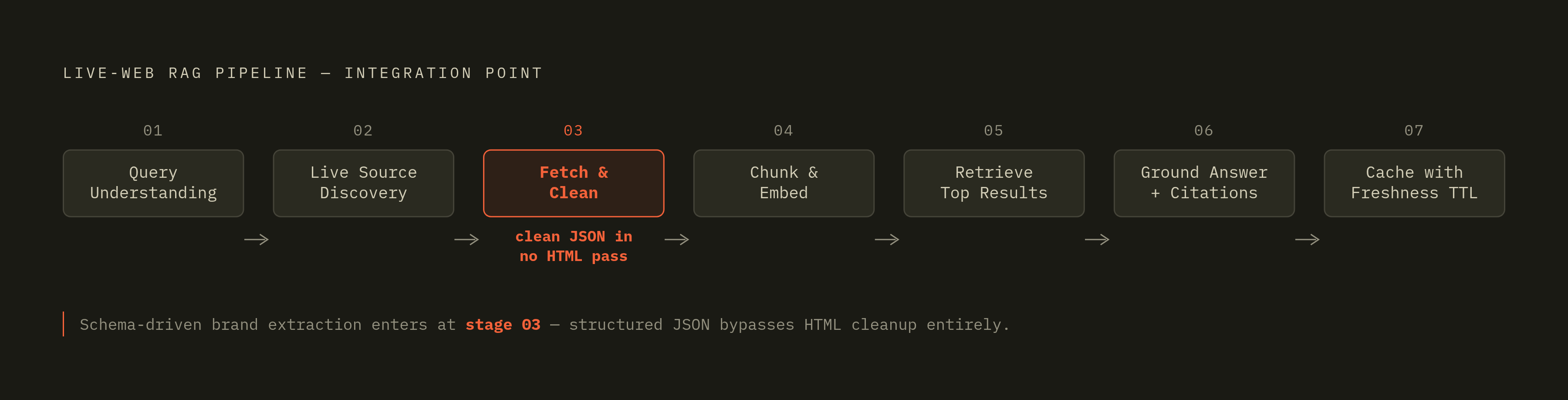
Schema-driven brand extraction earns its keep as a persistent layer an AI agent can query at runtime, not as a one-time lookup. That distinction matters most for companies an agent has never encountered in its training data.
Competitive intelligence is one clear case. An agent given a competitor's domain calls the extraction API with a schema built for pricing and positioning fields, and gets back a structured snapshot it can compare directly against whatever it already knows. Because the extraction happens against the live page, that comparison reflects the competitor's pricing today, not whatever existed when the model was trained.
RAG-powered customer support and sales intelligence is another. A live-web RAG pipeline typically runs seven stages: query understanding, live source discovery, fetch and clean, chunk and embed, retrieve the top results, ground the generated answer with citations, and cache the result with a freshness TTL attached. Brand data extracted as clean JSON walks straight into that pipeline at the fetch-and-clean stage already structured, so there is no HTML cleanup pass, and no tokens get wasted parsing boilerplate navigation and footer content. Web-scraping APIs built to output clean JSON or Markdown for LLM and RAG pipelines are the right tool for this stage. Document-AI tools, built for static files, are not.
Product onboarding is a third. The Cofounder case from General Intelligence shows this directly: ask a user for their website URL, and retrieve their design assets and tokens automatically through the Taste Labs Brand API, collapsing what would otherwise be a multi-step manual setup into a single API call. Because the extraction is schema-driven, the tokens that come back are typed and ready to apply inside the product immediately, not a pile of raw HTML the product still has to parse before it's useful.
Across all three cases, the integration point is the same: a single API call, a schema instead of a scraper, and a result an agent or a product can act on the moment it arrives.